The scanner
Lorcana players
actually use.
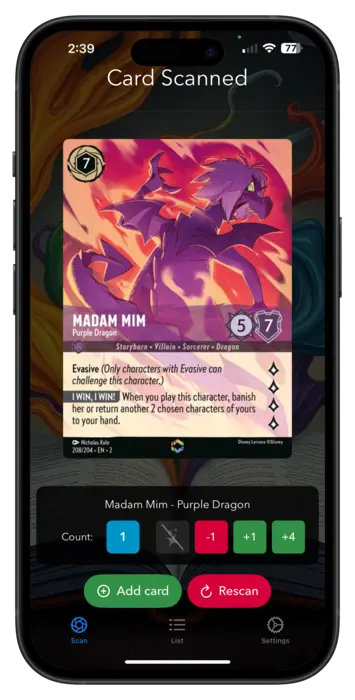
Point your camera at a card. Lorscana recognizes it across every set, in 5 languages, and keeps your collection tidy as you scan. On iPhone and iPad.
 Download in the App Store
What Lorscana does
Scan in seconds
Export to Dreamborn
Manage your inkwell
Auto scan mode
Frequently asked questions
How do I scan Disney Lorcana cards?
Open Lorscana on your iPhone or iPad, point your camera at any Lorcana card, and tap to scan. Lorscana identifies the card across every set in seconds and adds it to your collection. You can adjust quantity and toggle foil status right from the result screen.
Can Lorscana scan foil cards?
Yes. Lorscana scans both regular and foil versions of every card. You can toggle foil status on the result screen after each scan. In Bulk Scan Mode, a foil toggle applies to all cards scanned in the session, which helps when scanning through a new foil pack.
Do I need an account to use Lorscana?
No account required. Lorscana works entirely on your device. Just open the app and start scanning. Your collection is stored locally on your iPhone or iPad. No sign-up, no email, and no password needed to use any part of the app.
How do I export my Lorcana collection to Dreamborn.ink?
After scanning your cards, tap the Export button in Lorscana. The app sends your collection directly to Dreamborn.ink, a popular Lorcana collection and deck-building tool. Smart Export tracks what you have already sent and only exports new cards on repeat runs, so you won't create duplicates.
Which Lorcana sets does Lorscana support?
Lorscana supports all twelve Lorcana sets, including the most recent release, Attack of the Vine. New set support is added shortly after each new set launches. The scanner recognizes every card in your collection directly from your camera, with no manual browsing or set selection required.
Is Lorscana free?
Yes, Lorscana is free to download from the App Store. There are no subscriptions, in-app purchases, or paywalls. All features are included at no cost. You just need an iPhone or iPad running iOS. No account or internet connection is needed to scan.